Evidence reviewed 10 October 2026
Daily Quests: Counters, Baskets & Combat Tasks
Read daily quest requirements, choose an achievable objective and diagnose counters that do not advance.
§Understand the task list#
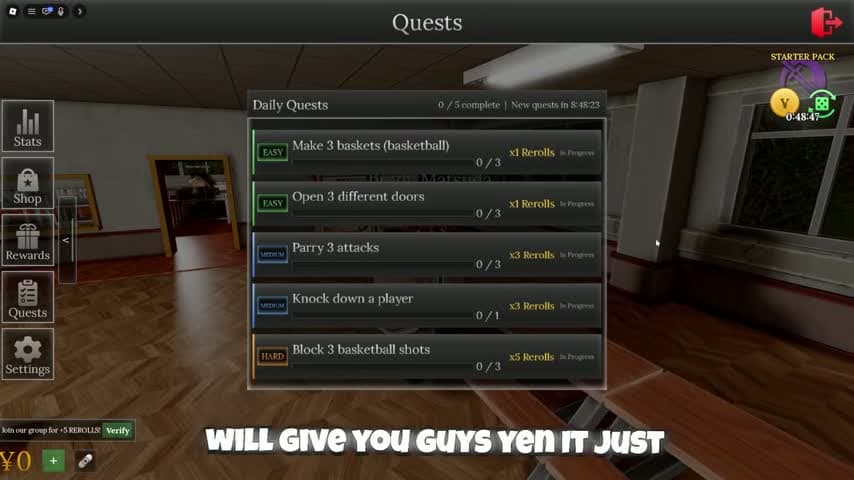
The recorded Quests menu has five objectives and a reset countdown. Its examples are make 3 baskets, open 3 different doors, parry 3 attacks, knock down a player and block 3 basketball shots.
These are a snapshot of one daily list, not a promise that your account receives the same five tasks. The menu displays reroll rewards beside the rows. Check the live requirement before repeating an action.
§Finish the simpler objective first#
For a door objective, find a door with an interaction prompt, open it and check the counter. Move to a different door for the next attempt. Reopening the same doorway does not match a requirement for different doors.
For baskets, enter the basketball activity and aim for a made shot. A throw that misses the hoop gives you a practice attempt; check the quest counter to distinguish a registered basket. Blocking shots is a separate task that needs another player shooting.
§Keep combat tasks distinct#
A parry objective, a block input and a knockdown objective use different words. Do not assume holding block is sufficient for a parry counter. Read the current combat controls, ask another player to practice and check the counter after one exchange.
Use a fightable area and watch the combat-state indicator. This guide does not promise a parry timing window, a damage number or a specific style bonus. Return to the combat guide if attacks fail to connect.
§If progress stays at zero#
Reopen Quests and compare the exact objective to your action. Verify that the activity is basketball when the task asks for basketball, that the ball went through the hoop for a basket, and that the door is a new door for a different-door task.
If a clearly matching action still fails, note the counter before and after, the server and the reset timer. Try a fresh matching attempt after the interface updates. Preserve that evidence for a developer report instead of spending rerolls to fix a counter.
§Continue in this section#
Hub
Campus Guides
Choose a practical guide for free rewards, daily objectives, basketball, student appearance or combat problems.
GuideArticle
Free Rerolls: Rewards, Quests & Spending Plan
Find the daily and playtime reward menus, compare free reroll routes and avoid spending a stockpile on the wrong field.
GuideArticle
Basketball: Join, Shoot & Check Quest Progress
Use the basketball activity controls, distinguish baskets from blocked shots and verify daily quest progress.