
Evidence reviewed 10 October 2026
Free Rerolls: Rewards, Quests & Spending Plan
Find the daily and playtime reward menus, compare free reroll routes and avoid spending a stockpile on the wrong field.
§Read the reward timers#
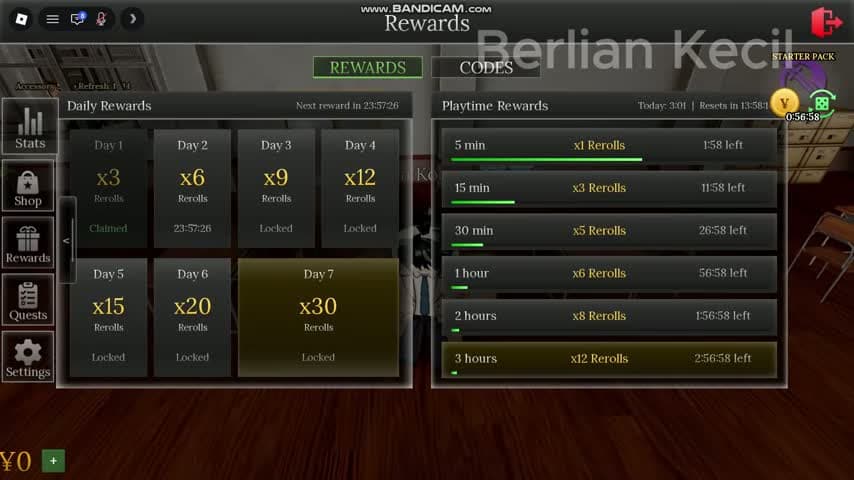
Open Rewards and stay on its Rewards tab. Daily rewards occupy the left panel; playtime milestones occupy the right. The recording shows a claimed Day 1, later days locked or timed, and separate playtime progress bars.
The recorded playtime milestones are 5 minutes, 15 minutes, 30 minutes, 1 hour, 2 hours and 3 hours. Read current amounts and reset labels in your server before planning a long session. The frame does not prove offline time counts or that every milestone is cumulative across servers.
§Choose a free route#
Use the available reward tile when you already meet its timer. If none is ready, inspect a daily quest you can complete during normal play. Codes are another route, with the acceptance limits on our codes page.
One recorded quest lists a reroll reward next to its objective. Use the task counter and completion state to verify a payout rather than treating every action as an automatic grant.
| Route | Where to check | What to verify |
|---|---|---|
| Daily rewards | Rewards, left panel | Available, claimed or locked status |
| Playtime rewards | Rewards, right panel | Timer and current reward amount |
| Daily quests | Quests | Objective counter and completion state |
| Codes | Rewards > Codes | Actual redemption response |
§Keep a reroll budget#
Choose the single change you want most before opening Stats. Read its label, note your stock and roll once. Check which field changed and how much stock remains. Stop when the result is acceptable.
An empty-looking accessory field can still have a reroll control. Rolling multiple fields without checking each result makes it harder to tell where your tickets went. Paid reroll packs are visible in Shop, but free routes let you postpone a purchase.
§Continue in this section#
Hub
Campus Guides
Choose a practical guide for free rewards, daily objectives, basketball, student appearance or combat problems.
GuideArticle
Codes: Current Reports & Redemption Help
Dated Anime High School RP code reports, reward amounts, conflicting older entries and the Rewards menu redemption route.
GuideArticle
Daily Quests: Counters, Baskets & Combat Tasks
Read daily quest requirements, choose an achievable objective and diagnose counters that do not advance.