
Evidence reviewed 10 October 2026
Fighting Styles: Where to Check & What to Verify
Locate the Fighting Style row in Stats and avoid spending rerolls on unsupported tier lists, odds or guaranteed outcomes.
§Find your current style#
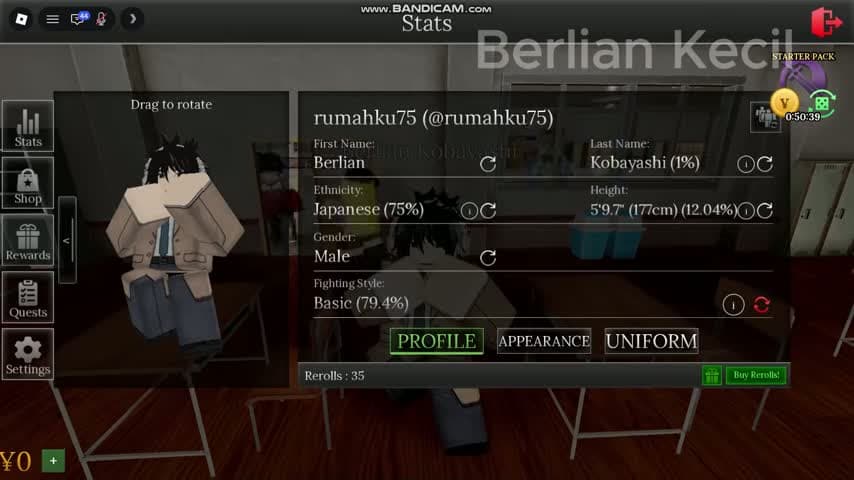
Open Stats and select Profile. Fighting Style sits beneath the identity fields in the reviewed frame. That character has Basic, with a percentage beside the label, an information icon and a circular control.
Use the information icon to read any current explanation before rolling. Keep a screenshot of the old result and your reroll stock so you can compare after a change.
§A displayed percentage has limits#
The recorded Basic row reads 79.4%. That is the interface label in one recording. It does not prove the entire style pool, a guaranteed result, a pity threshold or a calculation of how many tickets you need.
A code named PITY is also insufficient evidence for a pity mechanic. Read the current in-game information and any developer explanation before committing a large reroll stock.
§Test behavior before choosing a favorite#
Practice the current style with a willing player. Try the displayed Punch, Heavy, Block and Dodge actions individually, then watch whether they connect in a fightable area. Keep basketball mode and safe-zone restrictions out of that test.
No measured damage table, cooldown comparison or complete style roster was established in this review. A strongest-style ranking would need repeatable testing or explicit developer data. Spend based on a result you can inspect rather than a promised tier.
§Continue in this section#
Hub
Campus Guides
Choose a practical guide for free rewards, daily objectives, basketball, student appearance or combat problems.
GuideArticle
Combat & Safe Zones: Inputs, Escape & Knockdowns
Check combat mode, understand safe-zone entry restrictions and handle a knockdown without assuming instant healing.
Source
Sources & Verification
Official game identity, gameplay review dates and the limits of this independent campus guide.