
Evidence reviewed 10 October 2026
First Session: Rewards, Quests & Your Student
A first-session route through Rewards, Quests and Stats, with checks before rerolling and fighting.
Quick answer
Open Rewards first, inspect Quests, then use Stats to change one part of your character at a time. Learn where the safe areas are before joining a fight.
Work through your first session
Use current menus to confirm rewards and changes.
Claim before you spend
Open Rewards from the left menu. If the menu is collapsed, expand it first. The Rewards tab separates daily rewards from playtime rewards. Claim an available tile and check the reroll balance before closing the menu.
- Success check
- Confirm a claim label and reroll balance.
- If it remains unclear
- Read the current state or requirement and follow the matching guide below.
Read the supporting evidence
§Claim before you spend#
Open Rewards from the left menu. If the menu is collapsed, expand it first. The Rewards tab separates daily rewards from playtime rewards. Claim an available tile and check the reroll balance before closing the menu.
A timer means a reward is still waiting; a claimed or locked label explains why clicking it again will not pay out. The adjacent Codes tab uses a separate entry box. See the codes guide for dated reports rather than assuming every old video code still works.
Pick a task you can finish
Open Quests and read the action, required count and reward together. The recorded list includes making baskets, opening different doors, parrying, knocking down a player and blocking basketball shots.
- Success check
- Confirm one task counter changes after a matching action.
- If it remains unclear
- Read the current state or requirement and follow the matching guide below.
Read the supporting evidence
§Pick a task you can finish#
Open Quests and read the action, required count and reward together. The recorded list includes making baskets, opening different doors, parrying, knocking down a player and blocking basketball shots.
Start with an exploration or basketball task if you want to avoid fighting. Reopen Quests after one successful action and check whether its counter moved. The exact list can rotate; use your own task text.
Change one slot at a time
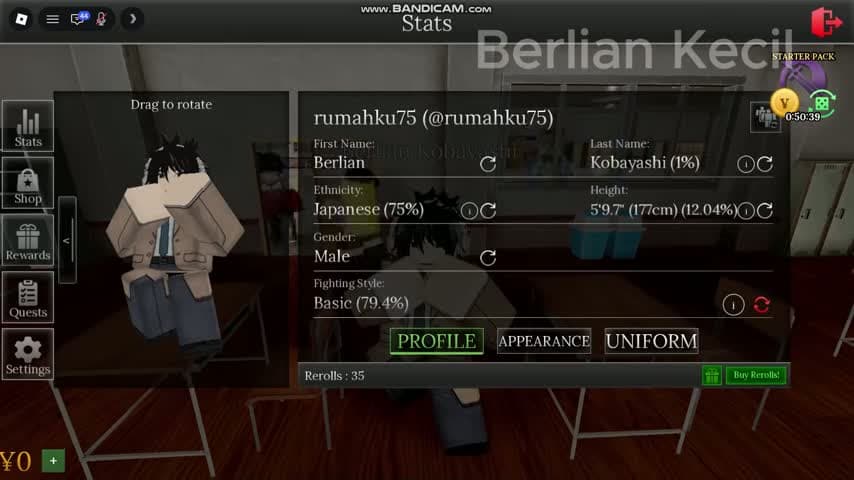
Open Stats. Profile, Appearance and Uniform divide the student editor. Check your reroll stock, pick one field and use its own circular control. Inspect the new value and the balance before making another change.
- Success check
- Confirm only the selected field changes in the preview.
- If it remains unclear
- Read the current state or requirement and follow the matching guide below.
Read the supporting evidence
§Change one slot at a time#
Open Stats. Profile, Appearance and Uniform divide the student editor. Check your reroll stock, pick one field and use its own circular control. Inspect the new value and the balance before making another change.
Treat a reroll as a replacement attempt. A field showing a percentage gives a clue about its result, but it does not establish a complete probability table or a guaranteed pity rule. Avoid rolling a field you already like.
Choose your campus loop
For a quiet session, explore, try basketball and return to Rewards when a timer finishes. For combat, read the on-screen input list outside a safe area and practice with someone who agrees to fight.
- Success check
- Confirm the activity or combat control list matches your plan.
- If it remains unclear
- Read the current state or requirement and follow the matching guide below.
Read the supporting evidence
§Choose your campus loop#
For a quiet session, explore, try basketball and return to Rewards when a timer finishes. For combat, read the on-screen input list outside a safe area and practice with someone who agrees to fight.
The red IN COMBAT state matters at doorways. Recorded gameplay shows a safe-zone rejection during combat, so keep enough room to disengage before your health is low.
Scope and sources
What to check in your current server
- Gameplay examples were recorded in early October 2026. Read current menus before spending resources; updates can change requirements and rewards.